
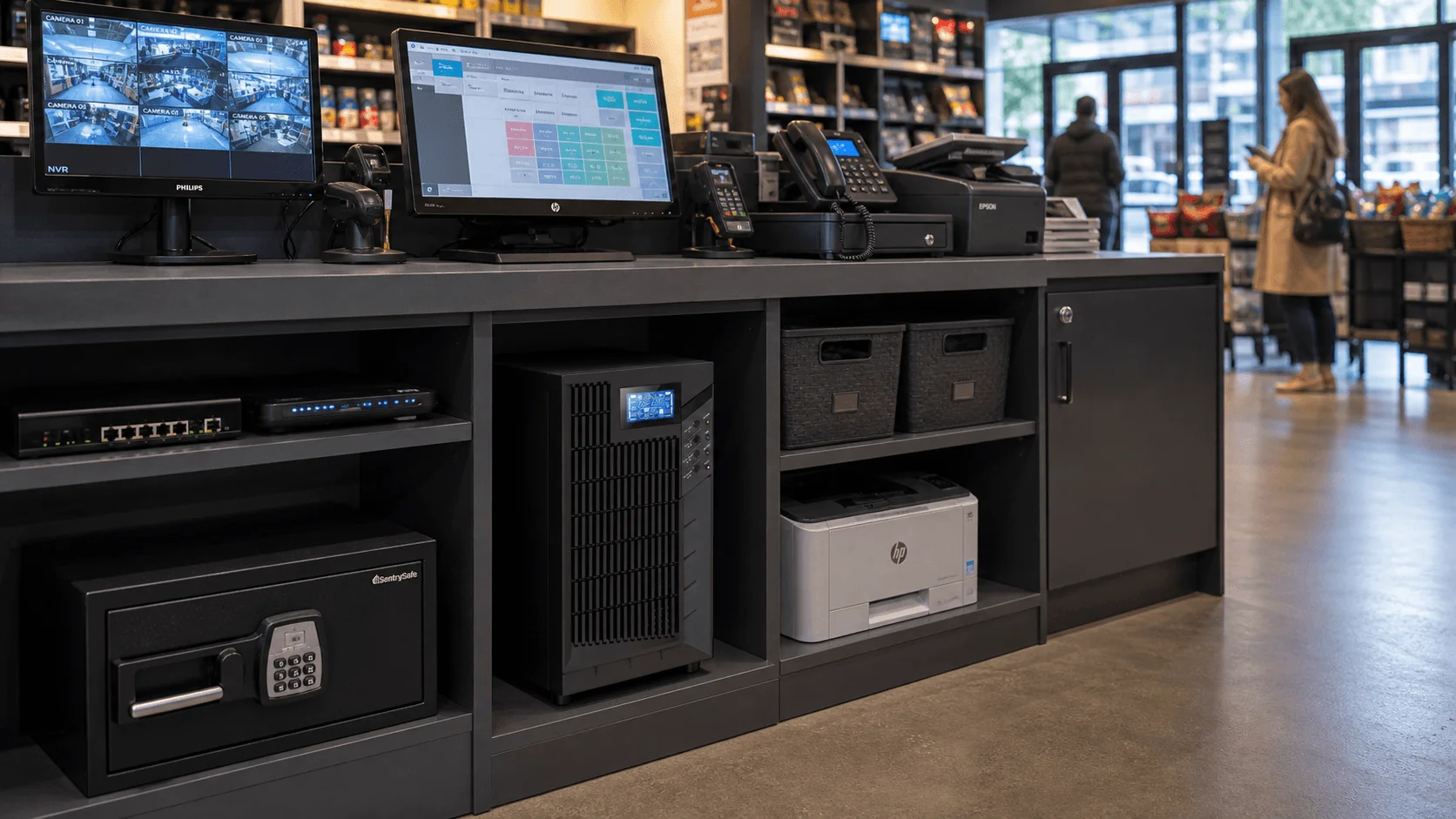
In modern retail, every transaction depends on stable power and reliable connectivity. From POS terminals, cash registers, barcode scanners, payment devices, self-checkout kiosks, routers, switches, Wi-Fi access points, inventory systems, security cameras, access control systems, digital signage, and store management platforms, electricity plays a direct role in daily store operations.
A sudden power outage, voltage fluctuation, surge, or unstable power supply can interrupt sales, disconnect payment systems, stop inventory updates, affect customer service, and increase security risks. For retailers, even a short period of downtime can lead to lost revenue, longer queues, frustrated customers, inaccurate stock records, and operational disruption.
A Retail UPS System, or Uninterruptible Power Supply for retail stores, provides short-term backup power and power protection for essential store equipment. It helps keep critical systems running during short outages, protects sensitive electronics from power problems, and gives staff enough time to complete transactions, save data, or shut down systems safely.
For small shops, convenience stores, supermarkets, pharmacies, restaurants, franchise stores, shopping centers, and large retail chains, UPS systems are a practical way to improve business continuity, protect equipment, and maintain a better customer experience.
Why UPS Systems Are Essential in Retail Environments
1. Keeping POS Systems and Transactions Running
The POS system is the center of daily retail operations. It handles sales, payment processing, receipts, discounts, loyalty programs, inventory updates, customer records, and sales reporting. If power fails during checkout, transactions may be interrupted and customers may be unable to complete purchases.
UPS systems help protect:
- POS terminals
- Cash registers
- Receipt printers
- Barcode scanners
- Payment terminals
- Mobile payment devices
- Self-checkout kiosks
- Customer display screens
- Cash drawer control systems
- Store tablets and handheld devices
For retail stores, POS backup power is one of the most important UPS applications because it directly affects sales continuity and customer satisfaction.
2. Protecting Store Network and Internet Connectivity
Many retail systems depend on network connectivity. Some stores use cloud-based POS platforms, while others rely on local servers or hybrid systems. In either case, routers, switches, firewalls, modems, Wi-Fi access points, and communication devices must remain powered for store operations to continue smoothly.
UPS systems can help keep the store network online by protecting:
- Routers
- Firewalls
- Network switches
- Wi-Fi access points
- Modems
- Optical network terminals
- Local POS servers
- Cloud POS gateways
- Back-office network devices
For modern retail operations, protecting the network cabinet is often just as important as protecting the POS terminal itself.
3. Maintaining Inventory and Order Accuracy
Retailers rely on digital systems to manage stock, replenishment, online orders, returns, loyalty programs, sales reports, and warehouse coordination. Power interruptions can disrupt inventory synchronization, create reporting errors, or interrupt order processing.
UPS systems help support:
- Inventory management systems
- Back-office computers
- Local store servers
- Network storage devices
- Order processing systems
- Stock counting terminals
- Warehouse communication devices
- Store management platforms
For chain stores, supermarkets, pharmacies, and high-volume retail businesses, reliable power helps ensure that store-level data remains accurate and synchronized with central management systems.
4. Supporting Security and Loss Prevention
Security systems are critical in retail environments. During a power outage, surveillance and access control should remain operational to protect staff, customers, inventory, and property.
UPS systems can provide backup power for:
- CCTV cameras
- Network video recorders
- Access control systems
- Alarm panels
- Electronic article surveillance systems
- Security network switches
- Door control systems
- Emergency communication devices
This is especially important for convenience stores, supermarkets, jewelry stores, electronics stores, warehouses, pharmacies, and retail chains with valuable inventory or extended operating hours.
5. Improving Customer Experience During Power Events
Retail customers expect fast checkout, reliable digital payment, clear communication, and a smooth shopping experience. When store systems shut down unexpectedly, customers may leave before completing purchases.
UPS systems can help maintain:
- Checkout continuity
- Electronic payment availability
- Self-checkout operation
- Customer service terminals
- Digital signage and queue displays
- Store communication systems
- Customer Wi-Fi equipment
For high-traffic retail locations, UPS backup power can reduce disruption and help staff manage temporary power problems more professionally.
Key UPS Application Scenarios in Retail Stores
POS Counters and Cash Registers
POS counters are the most common UPS application in retail. A compact UPS can protect the POS terminal, receipt printer, barcode scanner, payment terminal, and network device.
Recommended UPS focus:
- 600VA–2kVA UPS
- Short backup time
- Surge protection
- Compact tower design
- Quiet operation
- Easy installation under the counter
This solution is suitable for small shops, boutiques, cafés, pharmacies, restaurants, convenience stores, and retail counters.
Self-Checkout Kiosks
Self-checkout systems require power for touchscreens, scanners, payment devices, receipt printers, weighing systems, and network connectivity.
Recommended UPS focus:
- Compact UPS for each kiosk
- Stable output voltage
- Backup power for transaction completion
- Network continuity
- Surge protection
- Easy maintenance
For supermarkets, convenience stores, and large retail stores, UPS systems help reduce transaction interruptions and customer frustration during short power events.
Store Network Cabinet
The store network cabinet is a critical UPS protection point. If routers, switches, firewalls, modems, or Wi-Fi access points shut down, POS systems, payment devices, inventory systems, and security devices may stop working.
Recommended UPS focus:
- Rack-mounted online UPS
- 1kVA–6kVA capacity range
- Backup for router, firewall, switches, modem, and Wi-Fi controller
- SNMP or remote monitoring
- External battery pack option
- Stable power output
For chain stores, network UPS protection is especially useful for centralized management and remote maintenance.
Back Office and Inventory Systems
The back office may include computers, small servers, printers, inventory terminals, stock management systems, accounting systems, and communication devices.
Recommended UPS focus:
- 1kVA–3kVA UPS for office equipment
- Online UPS for local servers or NAS
- Backup for inventory and reporting systems
- Safe shutdown support
- Surge protection
This helps store managers continue essential operations during short outages.
Security and Surveillance Systems
Retail security systems should remain operational even when power fails.
Recommended UPS focus:
- UPS for CCTV cameras and NVR
- Backup for access control panels
- Backup for alarm systems
- UPS for PoE switches
- Runtime based on security requirements
- Remote alarm notification
For security applications, it is often best to protect the recording device, network switch, router, and selected cameras first.
Digital Signage and Customer Displays
Many retail environments use digital signage, menu boards, promotional screens, queue management displays, and customer information terminals.
Recommended UPS focus:
- Compact UPS for selected critical displays
- Surge protection
- Short runtime
- Safe shutdown support
- Centralized UPS for multiple displays if required
Not every display requires UPS protection, but important customer communication screens may benefit from backup power.
Supermarkets and Grocery Stores
Supermarkets depend on POS systems, self-checkout kiosks, weighing scales, barcode scanners, inventory platforms, surveillance systems, and sometimes refrigeration monitoring systems.
Recommended UPS focus:
- UPS for POS and self-checkout
- UPS for store network cabinet
- UPS for security systems
- UPS for inventory and weighing systems
- Backup for refrigeration monitoring controllers where required
Important note: standard small UPS units are usually not suitable for powering large refrigerators, freezers, cold rooms, or HVAC equipment for long periods. These loads require dedicated backup power design, such as generators, inverter systems, battery energy storage systems, or larger engineered power solutions.
Retail Chain Stores
Retail chains need consistent system availability across multiple locations. UPS systems help standardize power protection for POS, network equipment, security systems, and store management devices.
Recommended UPS focus:
- Standardized UPS model selection
- Remote monitoring
- Centralized maintenance strategy
- Battery replacement planning
- Multi-site deployment consistency
- Easy installation and service
For chain stores, remote monitoring and maintenance planning can significantly reduce operational risk.
Recommended UPS Types for Retail Applications
Line-Interactive UPS
A line-interactive UPS is suitable for basic retail equipment such as POS terminals, routers, small computers, cash registers, and payment devices. It provides affordable backup power and voltage regulation for short outages.
Best for:
- Small shops
- POS terminals
- Cash registers
- Routers and modems
- Receipt printers
- Barcode scanners
- Basic payment terminals
Online Double-Conversion UPS
An online UPS provides stronger power protection and stable output. It is suitable for critical store networks, local servers, self-checkout systems, and retail IT infrastructure.
Best for:
- Store network cabinets
- Local retail servers
- Self-checkout systems
- Security systems
- High-value retail environments
- Retail chain IT infrastructure
Rack-Mounted UPS
Rack-mounted UPS systems are ideal for retail network rooms, IT cabinets, and security equipment racks.
Best for:
- Routers and switches
- Firewalls
- Store servers
- CCTV/NVR systems
- PoE switches
- Network cabinets
Compact Tower UPS
Tower UPS systems are easy to place under counters, behind POS stations, or in back-office areas.
Best for:
- POS counters
- Cash registers
- Small office computers
- Payment terminals
- Customer service desks
UPS with External Battery Pack
External battery packs are useful when stores require longer backup time for networks, security systems, or critical POS areas.
Best for:
- Stores in unstable power areas
- Retail chains without generators
- Security systems
- Network cabinets
- High-traffic stores
- Remote branch locations
Modular UPS
For large retail facilities, shopping centers, distribution areas, or retail headquarters, modular UPS systems can provide scalable power protection.
Best for:
- Large supermarkets
- Shopping centers
- Retail distribution centers
- Retail headquarters
- Central IT rooms
- Facilities with future expansion plans
How to Choose the Right UPS for Retail Stores
1. Identify Critical Retail Loads
Not every device in a store requires UPS backup. The first step is to identify systems that directly affect sales, data, communication, and security.
Typical critical loads include:
- POS terminals
- Payment terminals
- Barcode scanners
- Receipt printers
- Routers and firewalls
- Network switches
- Wi-Fi access points
- Inventory computers
- Local servers
- CCTV and NVR systems
- Access control systems
- Alarm panels
- Self-checkout kiosks
For many retail stores, the best starting point is to protect the POS counter, network equipment, and security system.
2. Calculate UPS Capacity
UPS capacity should be selected based on actual equipment power consumption.
Important data includes:
- Total load in watts or VA
- Number of POS terminals
- Number of payment devices
- Network equipment power consumption
- Security system load
- Runtime requirement
- Future expansion margin
A UPS should not be continuously loaded at 100%. Leaving capacity margin improves reliability and allows future device expansion.
3. Define Required Backup Time
Backup time depends on store operations and power risk.
Common runtime options include:
- 5–10 minutes for transaction completion and safe shutdown
- 15–30 minutes for POS and network continuity
- 30–60 minutes for security and communication systems
- Longer runtime with external battery packs
If the store has a generator or other long-duration backup source, the UPS may only need to provide bridge power while the backup source starts. If there is no long-duration backup source, longer UPS runtime may be needed for critical systems.
4. Choose Centralized or Distributed UPS
Retail stores can use centralized UPS, distributed UPS, or a hybrid design.
Distributed UPS is suitable for:
- Individual POS counters
- Self-checkout kiosks
- Customer service desks
- Back-office computers
- Small branch stores
Centralized UPS is suitable for:
- Network cabinets
- Security systems
- Store servers
- Larger stores
- Supermarkets
- Chain store standardization
A hybrid approach is often best: small UPS units for POS stations and a rack-mounted UPS for the network cabinet.
5. Consider Remote Monitoring for Chain Stores
Retail chains often manage many stores across different cities or regions. Remote monitoring can help IT teams track UPS status without visiting each location.
Recommended monitoring features include:
- Battery health status
- Load percentage
- Runtime estimation
- Overload alarm
- Input/output voltage
- Temperature warning
- SNMP or network monitoring
- Email or software alerts
- Battery replacement reminders
Remote monitoring helps reduce downtime and supports centralized maintenance planning.
6. Plan Maintenance and Battery Replacement
UPS systems rely heavily on battery condition. If batteries are old or weak, the UPS may fail during an outage.
Recommended maintenance practices include:
- Regular battery inspection
- Runtime testing
- Load percentage review
- Alarm testing
- Ventilation check
- Dust cleaning
- Scheduled battery replacement
- Power event log review
For retail chains, it is helpful to standardize battery replacement cycles across stores.
7. Consider Store Environment and Installation
Retail spaces have practical limitations. UPS systems should be easy to install, quiet, safe, and suitable for the store layout.
Important factors include:
- Space under POS counters
- Noise level
- Heat dissipation
- Cable management
- Customer-facing appearance
- Dust and ventilation
- Access for maintenance
- Indoor or outdoor installation
- Safety clearance
Compact, quiet, and easy-to-maintain UPS models are usually preferred for retail environments.
Typical Retail UPS Solutions by Application
Small Retail Store
Recommended solution:
- 600VA–1.5kVA line-interactive UPS
- Backup for POS terminal, payment terminal, receipt printer, router, and small computer
- Short backup time
- Compact and cost-effective design
Convenience Store
Recommended solution:
- 1kVA–3kVA UPS
- Backup for POS counter, router, modem, CCTV/NVR, and access control
- Optional external battery pack
- Surge protection
- Quiet operation
Supermarket Checkout Area
Recommended solution:
- Multiple 1kVA–3kVA UPS units for POS lanes
- Rack-mounted UPS for network cabinet
- Backup for self-checkout kiosks
- UPS for weighing and barcode systems
- Security system backup
Store Network Cabinet
Recommended solution:
- 1kVA–6kVA rack-mounted online UPS
- Backup for router, firewall, switches, Wi-Fi access points, and store server
- SNMP monitoring
- Optional external battery pack
Retail Security System
Recommended solution:
- 1kVA–10kVA UPS depending on system size
- Backup for CCTV cameras, NVR, PoE switches, access control, and alarm systems
- Runtime based on security needs
- Remote alarm notification
Large Retail Chain Store
Recommended solution:
- Standardized UPS deployment across stores
- Compact UPS for POS stations
- Rack-mounted online UPS for network cabinets
- UPS for security systems
- Remote monitoring
- Centralized maintenance and battery replacement plan
Retail Headquarters or Distribution Support Office
Recommended solution:
- 10kVA–80kVA online or three-phase UPS
- Backup for servers, network systems, call center equipment, and order management platforms
- External battery cabinets
- Generator or long-duration backup compatibility
- Remote monitoring and maintenance bypass
Purchasing Advice for Retail UPS Projects
When purchasing a UPS system for retail stores, buyers should not only compare price. The right UPS solution should match the store size, number of POS systems, network design, security requirements, backup time target, installation environment, maintenance capability, and future expansion plan.
Before requesting a quotation, prepare the following information:
- Store type: small shop, supermarket, convenience store, chain store, shopping center store, restaurant, or retail office
- Equipment list
- Number of POS terminals
- Number of self-checkout kiosks
- Network equipment load
- Security system load
- Total load in W, kW, VA, or kVA
- Input and output voltage
- Required backup time
- Centralized or distributed UPS preference
- Long-duration backup source availability
- Installation location
- Space and noise limitations
- Remote monitoring requirement
- Number of stores or branches
- Future expansion plan
A professional UPS supplier should be able to provide UPS model selection, capacity calculation, battery runtime estimation, wiring guidance, monitoring options, installation suggestions, and maintenance planning.
Conclusion
Retail businesses depend on reliable power to keep transactions moving, protect customer experience, maintain inventory accuracy, support security systems, and reduce operational disruption. From small shops and convenience stores to supermarkets, self-checkout areas, retail chains, restaurants, and large commercial stores, UPS systems play an essential role in retail business continuity.
A well-designed retail UPS solution provides backup power, voltage regulation, surge protection, safe shutdown time, network continuity, transaction protection, and support for security infrastructure. As retail continues to evolve with digital payments, cloud or local POS systems, self-checkout, omnichannel sales, digital signage, smart shelves, and real-time inventory systems, UPS systems will become even more important for reliable store operations.
For store owners, retail chains, IT managers, facility teams, system integrators, and equipment buyers, selecting the right UPS system is not simply about avoiding power loss. It is about protecting sales, data, security, customer trust, and the everyday reliability of retail operations.
Frequently Asked Questions
What is a retail UPS system?
A retail UPS system is an uninterruptible power supply designed to provide backup power and power protection for POS terminals, cash registers, payment terminals, routers, switches, security cameras, inventory systems, and other essential retail equipment.
It helps protect store operations from power outages, voltage fluctuations, surges, and unexpected shutdowns.
Why do retail stores need UPS systems?
Retail stores need UPS systems to keep POS transactions running, protect payment and inventory systems, maintain network connectivity, support security systems, and reduce downtime during power outages or voltage fluctuations.
A properly selected UPS can help stores complete transactions, protect sales data, keep security equipment online, and maintain a smoother customer experience during short power interruptions.
What type of UPS is best for POS systems?
For basic POS systems, a line-interactive UPS is often sufficient because it provides backup power, surge protection, and voltage regulation.
For stores with cloud POS, self-checkout kiosks, local servers, critical network equipment, or high transaction volume, an online UPS may provide stronger and more stable power protection.
Can a UPS keep card payment terminals working during a power outage?
Yes. If the POS terminal, payment device, router, modem, and network switch are connected to a properly sized UPS, card payment systems can continue operating during short power interruptions.
For stores using electronic payments or cloud-based POS systems, protecting network equipment is just as important as protecting the payment terminal itself.
How long should a retail UPS provide backup power?
For basic POS systems, 5–15 minutes may be enough to complete transactions and shut down safely. For network equipment, security systems, and store communication devices, 30–60 minutes or longer may be required depending on the store’s needs.
Longer runtime can be achieved with external battery packs or a larger backup power design.
Do supermarkets need UPS systems?
Yes. Supermarkets can use UPS systems for POS lanes, self-checkout kiosks, store network equipment, security systems, inventory systems, weighing scales, and selected monitoring devices.
However, large refrigeration loads, freezers, cold rooms, and HVAC systems usually require dedicated backup power design rather than standard small UPS units.
What information is needed to choose a UPS for a retail store?
To recommend the right retail UPS solution, the following information is usually required: number of POS terminals, equipment list, total load, input/output voltage, required backup time, installation location, network equipment details, security system requirements, remote monitoring needs, and number of store locations if it is a chain project.
Need a Reliable UPS Solution for Your Retail Store?
Whether you are protecting a retail store, POS system, supermarket, self-checkout area, security system, inventory platform, or chain store network, choosing the right UPS solution helps reduce downtime, protect transactions, and maintain a better customer experience.
Share your equipment load, number of POS terminals, voltage, backup time, installation environment, and monitoring requirements with us. Our team can help recommend the right line-interactive UPS, online UPS, rack-mounted UPS, battery configuration, and retail power protection solution for your project.