
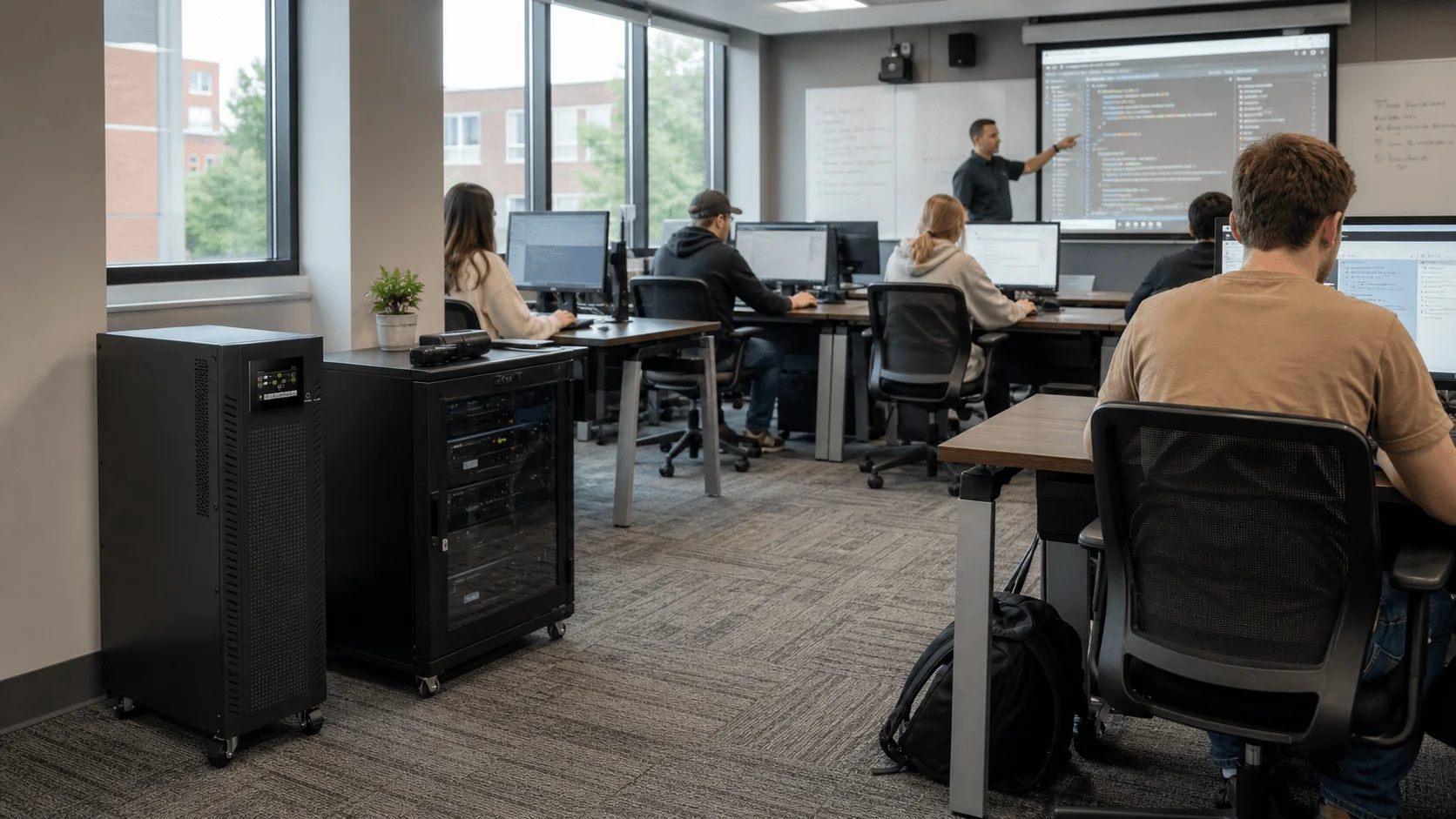
Educational institutions are becoming increasingly digital. Schools, colleges, universities, training centers, libraries, laboratories, and research campuses now rely on computers, projectors, interactive whiteboards, Wi-Fi networks, learning management systems, online resources, student information systems, cloud platforms, security cameras, access control, and emergency communication systems.
When power fails or becomes unstable, teaching can stop, online exams can be interrupted, campus networks can go offline, administrative systems may become unavailable, and safety systems may be affected. A UPS system for educational institutions, or Uninterruptible Power Supply for schools and universities, provides short-term backup power and power protection for essential teaching, IT, communication, and safety infrastructure.
For modern education environments, UPS systems are not simply accessories for computers. They are part of a reliable digital campus infrastructure, helping schools maintain learning continuity, protect equipment, preserve data, and support campus safety during power interruptions.
Why UPS Systems Are Essential in Educational Institutions
1. Maintaining a Continuous Learning Environment
Modern classrooms often depend on digital teaching tools. A sudden power interruption can stop presentations, disconnect online learning platforms, shut down interactive whiteboards, interrupt projectors, or affect computer-based lessons.
UPS systems help protect:
- Classroom computers
- Interactive whiteboards
- Projectors and AV systems
- Teacher workstations
- Online teaching devices
- Smart classroom controllers
- Wi-Fi access points
- Digital signage
- Exam and testing systems
For daily teaching, a UPS does not always need to power every classroom device for a long time. In many cases, it only needs to provide enough backup time to save work, finish an activity, keep network access running, or shut down equipment safely.
2. Protecting School and Campus IT Infrastructure
Educational institutions invest heavily in IT infrastructure. Servers, storage devices, network switches, routers, firewalls, Wi-Fi controllers, student information systems, and cloud access points all require stable power.
A properly selected UPS system helps protect campus IT from:
- Power outages
- Voltage fluctuations
- Power surges
- Sudden shutdowns
- Data corruption
- Network downtime
- Hardware damage
- Abnormal system restarts
In schools and universities, network stability is especially important because classrooms, libraries, offices, laboratories, dormitories, and administrative departments may all depend on the same campus network.
3. Supporting Online Learning, Exams, and Digital Resources
Many educational institutions now use learning management systems, online assignments, digital textbooks, cloud storage, video conferencing, virtual classrooms, and online exam platforms.
If campus routers, switches, servers, or Wi-Fi systems lose power, students and teachers may lose access to essential learning resources.
UPS systems can help maintain:
- Learning management systems
- Campus Wi-Fi
- Library databases
- Student portals
- Online exam platforms
- Digital attendance systems
- Cloud-based teaching tools
- Remote learning communication
For institutions that use hybrid learning or online testing, UPS protection for network and IT infrastructure is especially important.
4. Protecting Administrative Operations
Behind every school or university is a large administrative system. Enrollment, finance, payroll, student records, admissions, scheduling, staff communication, transportation management, and facility systems all depend on reliable IT.
UPS systems protect:
- Administrative computers
- Student information systems
- Finance and accounting systems
- Local servers
- Network storage
- Communication platforms
- Printers and document systems
- Data backup devices
For universities and large campuses, UPS systems may also protect departmental servers, research data, laboratories, and campus data centers.
5. Supporting Campus Safety and Emergency Communication
Educational institutions must keep students, teachers, staff, and visitors safe. During a power outage, key safety and communication systems should remain operational.
UPS systems can support:
- CCTV cameras
- Network video recorders
- Access control systems
- Emergency notification systems
- Intercom systems
- Public address systems
- Security control rooms
- Campus guard stations
- Emergency communication devices
UPS systems used for safety-related applications should be selected and installed according to local electrical regulations, school safety requirements, manufacturer instructions, and professional engineering guidance.
Key UPS Application Scenarios in Educational Institutions
Digital Classrooms
Digital classrooms may include computers, interactive displays, projectors, document cameras, speakers, tablets, and network-connected teaching equipment.
Recommended UPS focus:
- Compact UPS for classroom technology
- Short backup time
- Surge protection
- Quiet operation
- Easy installation
- Safe shutdown support
For ordinary classrooms, 600VA–2kVA UPS units may be suitable depending on the connected equipment.
Computer Labs
Computer labs require stable power for multiple desktops, monitors, network switches, teaching screens, and sometimes local servers.
Recommended UPS focus:
- UPS for teacher station and network switch
- UPS for selected critical computers
- Online UPS for lab server or control cabinet
- Centralized UPS for larger labs
- Surge protection and safe shutdown
- Proper load calculation
For larger computer labs, it is often more practical to protect the network cabinet, teacher workstation, server, and selected critical devices rather than every student computer for long runtime.
Campus Network and Wi-Fi Systems
The campus network is one of the most important UPS protection points. If routers, switches, firewalls, Wi-Fi controllers, and access points lose power, classrooms, offices, libraries, dormitories, and labs may all lose connectivity.
Recommended UPS focus:
- Rack-mounted online UPS
- Backup for routers, firewalls, switches, and Wi-Fi controllers
- SNMP or remote monitoring
- External battery pack option
- 30–60 minutes runtime for network continuity
- Generator or long-duration backup compatibility for larger campuses
For schools and universities, protecting the network room is often more valuable than protecting every classroom device individually.
Libraries and Learning Resource Centers
Libraries now provide digital catalogs, online databases, e-book systems, public computers, self-checkout systems, security gates, and research platforms.
Recommended UPS focus:
- UPS for library servers and network equipment
- Backup for catalog and circulation systems
- UPS for public access computer areas
- Protection for digital resource access
- Quiet and space-saving design
Administrative Offices
Administrative offices need reliable power for records, finance, admissions, scheduling, and communication.
Recommended UPS focus:
- Line-interactive UPS for basic workstations
- Online UPS for servers and network equipment
- Backup for student information systems
- UPS for communication and document systems
- Safe shutdown software
School Security and Access Control Systems
Security systems should remain operational during power events, especially during emergencies or after-hours periods.
Recommended UPS focus:
- UPS for CCTV and NVR systems
- Backup for access control panels
- Backup for door locks and card readers
- UPS for security network switches
- Alarm integration
- Runtime based on safety requirements
For safety applications, local building codes and school security requirements should always be considered.
University Laboratories and Research Facilities
Universities may operate laboratories with sensitive instruments, data logging systems, environmental monitoring equipment, research computers, and specialized testing equipment.
Recommended UPS focus:
- Online UPS for sensitive instruments
- Backup for data acquisition systems
- UPS for laboratory servers and workstations
- External battery modules if longer runtime is required
- Surge protection and voltage regulation
- Coordination with laboratory equipment requirements
For high-value laboratory instruments, always check the equipment manufacturer’s power quality and backup power requirements before selecting a UPS.
Campus Server Rooms and Data Centers
Large schools and universities may operate their own server rooms or data centers to support student systems, research databases, campus portals, email, storage, surveillance, and administrative systems.
Recommended UPS focus:
- Online double-conversion UPS
- Rack-mounted or three-phase UPS
- Modular UPS for scalability
- External battery cabinets
- N+1 redundancy for critical systems
- Remote monitoring
- Generator or long-duration backup compatibility
Emergency Communication and Safety Systems
Emergency communication systems may include public address systems, mass notification platforms, intercoms, campus radios, emergency phones, and security command centers.
Recommended UPS focus:
- High-reliability online UPS
- Backup for communication controllers
- Backup for network and security equipment
- Generator bridging where available
- Alarm and monitoring integration
- Regular battery testing
- Coordination with local fire, electrical, and safety regulations
Recommended UPS Types for Educational Applications
Line-Interactive UPS
A line-interactive UPS is suitable for basic classroom and office equipment. It provides affordable backup power, surge protection, and automatic voltage regulation for smaller loads.
Best for:
- Teacher computers
- Small classroom devices
- Routers and modems
- Administrative workstations
- Small office equipment
Online Double-Conversion UPS
An online UPS is recommended for critical IT systems because it provides continuous power conditioning and stable output.
Best for:
- School servers
- Campus network rooms
- Computer lab servers
- Security systems
- Research equipment
- Online exam systems
- University IT rooms
Rack-Mounted UPS
Rack-mounted UPS systems are ideal for IT cabinets and network rooms.
Best for:
- Routers and switches
- Firewalls
- Wi-Fi controllers
- Servers
- Storage systems
- Campus network racks
Tower UPS
Tower UPS systems are easy to install in classrooms, offices, libraries, and small labs.
Best for:
- Individual classrooms
- Administrative desks
- Small library systems
- Teacher workstations
- Small AV systems
Modular UPS
A modular UPS is suitable for universities, large campuses, research buildings, and central IT rooms that need scalable and redundant power protection.
Best for:
- University data centers
- Large campus IT rooms
- Multi-building campuses
- Research facilities
- Facilities with future expansion plans
UPS with External Battery Packs
External battery packs are useful when longer backup time is required.
Best for:
- Campus network rooms
- Security systems
- Emergency communication systems
- Server rooms
- Remote school campuses
- Areas with unstable power supply
How to Choose the Right UPS for Schools and Universities
1. Identify Critical Loads
Not every device on campus needs UPS protection. Schools should prioritize systems that support teaching, communication, safety, and data continuity.
Typical critical loads include:
- Network switches
- Routers and firewalls
- Wi-Fi controllers
- School servers
- NAS storage
- Computer lab control stations
- Security cameras
- Access control systems
- Emergency communication systems
- Student information systems
- Library servers
- Selected classroom technology
2. Calculate UPS Capacity
UPS capacity should be based on actual load, not only the number of devices.
Important data includes:
- Total load in W, kW, VA, or kVA
- Power factor
- Input and output voltage
- Single-phase or three-phase requirement
- Number of protected devices
- Startup power requirement
- Future expansion margin
For schools and universities, leaving capacity margin is important because additional classroom devices, Wi-Fi access points, servers, or security systems may be added later.
3. Define Backup Runtime
Backup time depends on the application.
Common runtime options include:
- 5–10 minutes for safe shutdown
- 10–20 minutes for classroom equipment
- 30–60 minutes for campus networks and security systems
- Longer runtime with external battery packs
- Generator bridging for large campuses
For most educational institutions, UPS systems should prioritize continuity for network, communication, safety, and IT systems rather than trying to power every classroom device for long periods.
4. Choose Centralized or Distributed UPS
Educational institutions can use centralized UPS, distributed UPS, or a hybrid approach.
Centralized UPS is suitable for:
- Server rooms
- Network rooms
- Security control rooms
- Campus IT infrastructure
- Large computer labs
Distributed UPS is suitable for:
- Individual classrooms
- Teacher desks
- Library terminals
- Administrative offices
- Small labs
- Remote buildings
A hybrid approach is often best: centralized UPS for core IT infrastructure and smaller UPS units for selected classrooms or offices.
5. Plan for Monitoring and Maintenance
UPS systems must be maintained to remain reliable. A weak battery may appear normal but fail during an outage.
Recommended features include:
- Battery health monitoring
- Runtime estimation
- Load percentage display
- Overload alarm
- Temperature warning
- SNMP or network monitoring
- Automatic shutdown software
- Event logs
- Remote alerts
Regular maintenance should include battery inspection, runtime testing, ventilation checks, alarm testing, dust cleaning, and scheduled battery replacement.
6. Consider Safety, Noise, and Installation Environment
Schools and universities must also consider practical installation conditions.
Important factors include:
- Noise level
- Heat dissipation
- Student safety
- Cable management
- Space limitation
- Ventilation
- Rack or tower placement
- Access for maintenance
- Protection from tampering
- Fire and electrical safety requirements
For classrooms and libraries, quiet and compact UPS models are usually preferred. For network rooms and server rooms, rack-mounted UPS systems with monitoring are usually more suitable.
Typical UPS Solutions by Educational Application
Classroom or Teacher Desk
Recommended solution:
- 600VA–1.5kVA line-interactive UPS
- Backup for teacher computer, projector, interactive display, and router
- Short backup time
- Surge protection
- Quiet operation
Computer Lab
Recommended solution:
- 1kVA–10kVA UPS depending on load
- Backup for teacher station, network switch, local server, and selected critical computers
- Online UPS recommended for lab servers
- Safe shutdown support
School Network Cabinet
Recommended solution:
- 1kVA–6kVA rack-mounted online UPS
- Backup for router, firewall, switch, Wi-Fi controller, and NAS
- Optional external battery pack
- SNMP or remote monitoring
Administrative Office
Recommended solution:
- 1kVA–3kVA UPS for workstations and communication equipment
- Online UPS for office server or local network cabinet
- Backup for records, finance, admissions, and communication systems
Library and Learning Resource Center
Recommended solution:
- 1kVA–6kVA UPS
- Backup for catalog server, network equipment, public terminals, and self-checkout systems
- Quiet installation
- Surge protection
University Server Room
Recommended solution:
- 3kVA–40kVA online UPS
- Rack-mounted or tower configuration
- External battery modules
- Maintenance bypass
- Remote monitoring
- Long-duration backup compatibility
Campus Data Center
Recommended solution:
- 40kVA–300kVA+ three-phase or modular UPS
- N+1 redundancy if required
- External battery cabinets
- Centralized monitoring
- Generator integration where available
- Professional preventive maintenance plan
Security and Emergency Communication Systems
Recommended solution:
- 1kVA–20kVA online UPS depending on system size
- Backup for CCTV, NVR, access control, PA system, intercom, and emergency communication devices
- External battery packs if longer runtime is required
- Alarm integration
- Compliance with local safety and electrical requirements
Purchasing Advice for Education UPS Projects
When purchasing a UPS system for schools or universities, buyers should not select products only by price. The correct UPS solution should match the institution’s teaching model, campus size, IT infrastructure, safety requirements, backup time target, maintenance capability, and future expansion plan.
Before requesting a quotation, prepare the following information:
- Institution type: school, college, university, training center, library, or laboratory
- Application area: classroom, computer lab, server room, network cabinet, security system, or campus data center
- Equipment list
- Total load in W, kW, VA, or kVA
- Input and output voltage
- Single-phase or three-phase requirement
- Required backup time
- Centralized or distributed UPS preference
- Generator or long-duration backup availability
- Battery type preference
- Installation environment
- Noise and space limitations
- Monitoring requirement
- Number of buildings or sites
- Future expansion plan
- Local electrical and safety requirements
A professional UPS supplier should be able to provide capacity calculation, runtime estimation, battery configuration, wiring guidance, monitoring options, installation suggestions, and maintenance advice.
Conclusion
Educational institutions depend on reliable power to support teaching, learning, research, administration, safety, and communication. From digital classrooms and computer labs to campus networks, libraries, server rooms, laboratories, and emergency systems, UPS systems play an essential role in keeping educational operations stable and secure.
A well-designed education UPS solution provides backup power, voltage regulation, surge protection, safe shutdown time, data protection, communication continuity, and support for campus safety systems. As schools and universities continue adopting digital learning, cloud platforms, smart classrooms, online exams, and connected security systems, UPS systems will remain an important part of resilient educational infrastructure.
For school administrators, IT managers, facility teams, system integrators, and education project buyers, choosing the right UPS system is not simply about preventing power loss. It is about protecting learning continuity, campus safety, digital access, administrative efficiency, and the long-term value of educational technology investments.
Frequently Asked Questions
What is an education UPS system?
An education UPS system is an uninterruptible power supply designed to provide backup power and power protection for schools, universities, classrooms, computer labs, campus networks, servers, libraries, security systems, and emergency communication systems.
It helps protect teaching, learning, administration, and campus safety infrastructure from power outages, voltage fluctuations, surges, and unexpected shutdowns.
Why do schools need UPS systems?
Schools need UPS systems to keep classroom technology, network equipment, administrative systems, security devices, and emergency communication systems running during power outages or voltage fluctuations.
A properly selected UPS can help maintain learning continuity, protect IT equipment, reduce data loss, and support campus safety during short power interruptions.
What type of UPS is best for classrooms?
For basic classroom equipment, a line-interactive UPS is often sufficient. It can provide backup power, surge protection, and voltage regulation for teacher computers, projectors, small displays, and basic AV equipment.
For interactive displays, network-connected equipment, online teaching devices, or critical teaching systems, an online UPS may provide stronger and more stable power protection.
What UPS is suitable for computer labs?
Computer labs may use a centralized online UPS for the teacher station, lab server, network switch, and selected critical computers. Larger labs may require several UPS units or a higher-capacity centralized UPS depending on the number of devices and backup time requirement.
For most computer labs, it is often more practical to protect the network cabinet, teacher workstation, lab server, and selected critical equipment rather than every student computer for long runtime.
Can a UPS keep campus Wi-Fi working during a power outage?
Yes. If routers, switches, firewalls, Wi-Fi controllers, and access points are protected by a properly sized UPS, campus Wi-Fi can continue operating during short power interruptions.
For schools and universities that rely on online learning, cloud platforms, digital classrooms, and campus communication systems, protecting the network infrastructure is one of the most important UPS applications.
How long should a school UPS provide backup power?
For classrooms, 5–20 minutes may be enough for safe shutdown or lesson continuity. For network rooms, security systems, server rooms, and emergency communication systems, 30–60 minutes or longer may be required.
The right backup time depends on the protected load, power reliability, generator or long-duration backup availability, and the importance of the system being protected.
What information is needed to choose a UPS for a school or university?
To recommend the right education UPS solution, the following information is usually required: equipment list, total load, input/output voltage, phase requirement, required backup time, installation location, monitoring needs, generator or long-duration backup availability, number of buildings or sites, and future expansion plan.
Need a Reliable UPS Solution for Your School or University?
Whether you are protecting classrooms, computer labs, campus networks, libraries, server rooms, security systems, or university data infrastructure, choosing the right UPS solution helps maintain learning continuity, protect equipment, and support campus safety.
Share your equipment load, voltage, backup time, installation environment, monitoring needs, and future expansion requirements with us. Our team can help recommend the right line-interactive UPS, online UPS, rack-mounted UPS, modular UPS, battery configuration, and education power protection solution for your project.